October 7, 2026
•
7 min
Learn how to plan a smoother DC-to-Cloud migration with Refined, avoid common pitfalls, and safely modernize your site experience.
For many Atlassian admins, the pressure to migrate has been building for years. With the news of DC end-of-life last fall, migrating from Confluence Data Center to Cloud is no longer a question of “if”, it’s a question of how and when.
But there’s practical challenges. Instances have grown organically, customizations have piled up, and critical sites are now deeply embedded in everyday work. And as migration finally becomes unavoidable, it’s tempting to treat it as a technical exercise: move the data, recreate what exists, and deal with improvements later.
In practice, that approach often leads to rework, frustration, and a Cloud setup that feels just as hard to manage as the DC one it replaced.
This post is designed to help you avoid that outcome. It focuses on how to plan a deliberate, phased Cloud migration using Refined Sites, so you can reduce risk, minimize disruption, and use Cloud as an opportunity to improve (not just relocate) your sites.
Often, the biggest risk in a DC-to-Cloud migration isn’t the migration itself — it’s waiting too long to plan.
At Refined, we’ve noticed that when planning starts late, teams are more likely to:
That’s costly in two ways. First, it increases admin effort after migration. Second, it erodes user trust when the “new” Cloud experience feels confusing or incomplete.
Cloud migration isn’t only about infrastructure. It directly affects how users find information, how teams collaborate, and how much effort admins spend maintaining sites over time. Treating it purely as a technical lift-and-shift almost guarantees missed opportunities.
Early planning gives you space to make better decisions — especially around structure, navigation, and site experience — before those decisions are locked in. And we at Refined will help you do this.
A successful Cloud migration is not a case of copying your DC setup as-is into Cloud. Instead, it’s an opportunity to simplify your site structure, improve navigation, and lower ongoing maintenance.
Most admins already know where DC falls short. At Refined, common goals we hear from admins repeatedly include:
It’s a mistake to try to preserve every structure and customization just because it exists today. Many DC setups reflect years of compromise — decisions made to work around platform limitations, scale constraints, or tooling gaps that no longer apply in the same way on Cloud.
Refined helps by separating site experience from underlying Confluence spaces. That means you can plan what the Cloud experience should look like first, instead of letting legacy structures dictate it.
Before migrating anything, it’s worth being explicit about your desired outcomes. If Cloud doesn’t meaningfully improve navigation, usability, or admin effort, then something has gone wrong — even if the migration itself was technically successful.
Planning doesn’t require a months-long audit, but it does require honesty.
Before migrating, ask yourself a few straightforward questions:
At Refined we’ve seen that many teams, for example, may have highly customized navigation built to compensate for rigid space structures caused by DC limitations. Similarly, permissions or section-level configurations may be tightly tied to Server/DC behavior and must be reconfigured on Cloud.
This assessment phase is about deciding what deserves to move forward, and what doesn’t.
Refined helps you accomplish that with our Refined Preparation Guide. It offers specific advice on what to rethink as you prepare your setup. Some historical constraints can be removed through Cloud, with new flexibility introduced, such as:
Taking advantage of these options requires intent. If you skip assessing your setup, you’re likely to carry unnecessary complexity into Cloud and pay for it later by way of rework.
-> Book a migration assessment to sanity-check your current setup and priorities.
In our experience, rushed migrations tend to fail in predictable ways.
Some of the most common pitfalls include:
These issues aren’t usually caused by missing features. They’re caused by decisions made without enough planning time.
At Refined, we help teams migrate platforms without disrupting navigation and user journeys. This is achieved by keeping site structure and experience flexible. Because Refined Sites works alongside native Confluence, you can iterate on your site experience without re-migrating content or restructuring spaces.
That flexibility is especially valuable when you need to validate assumptions with users before finalizing your Cloud setup.
-> Read our Preparation Guide for a detailed breakdown of what to assess before migrating.
The most reliable Cloud migrations follow a phased approach, rather than a single “big bang.”
A simple roadmap usually looks like this:
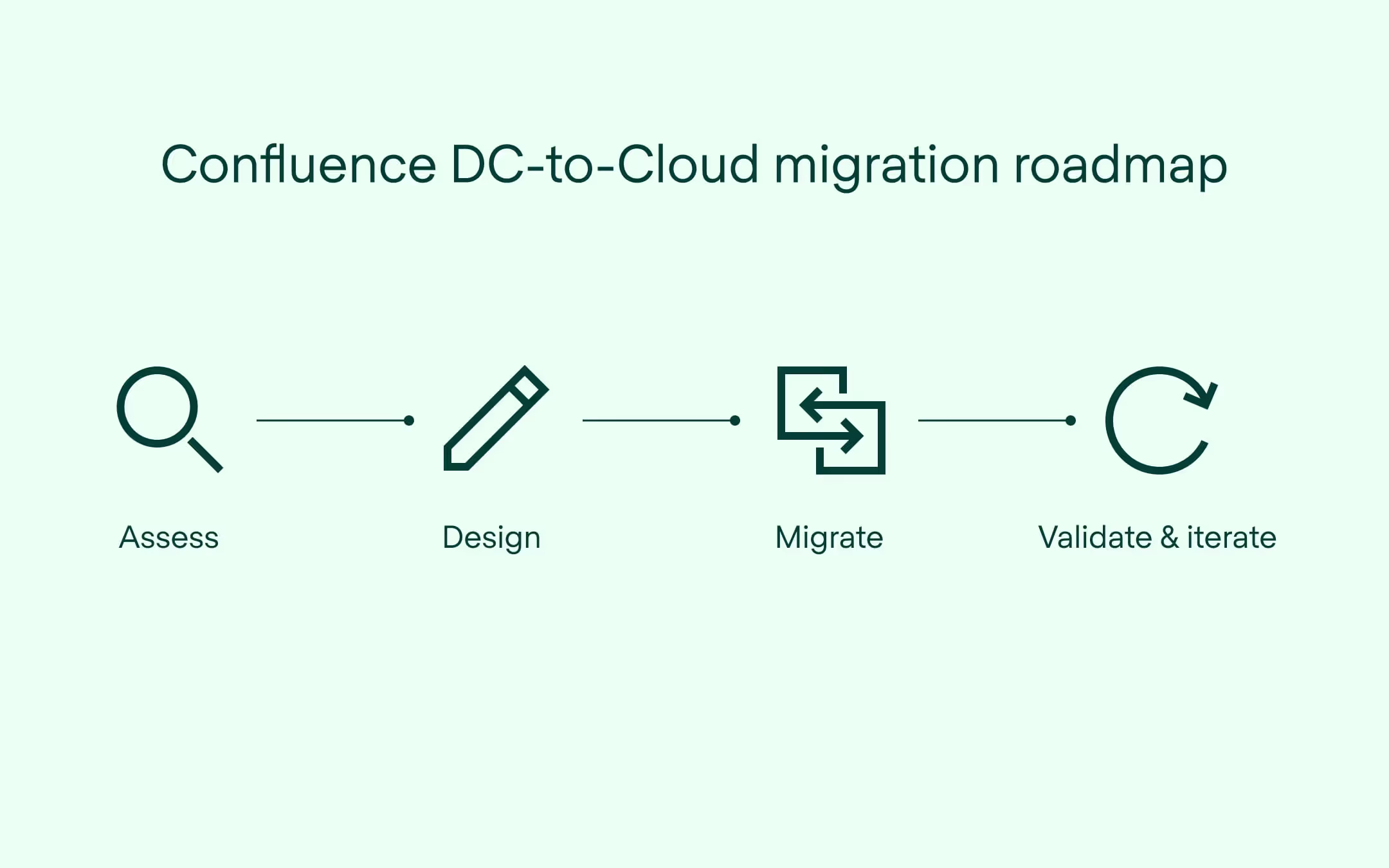
How long each phase takes depends heavily on your organization’s size, complexity, compliance requirements, and urgency. For some teams, assessment and redesign may take weeks, and for larger or more regulated environments it may take months. The key is not the speed of each phase, but the clarity and sequencing of the work.
Once you’re ready to migrate, the Refined Migration Assistant helps reduce manual effort by automating large parts of the process.
The Migration Assistant allows you to:
This replaces what would otherwise be a time-consuming, one-by-one site rebuild.
Cloud migration is not only about fixing what’s not working. It’s also an opportunity to rethink how you use your Atlassian platform more broadly.
With Refined Sites on Cloud, many teams go beyond rebuilding an intranet. They use Confluence and JSM to create external documentation sites, partner extranets, or unified knowledge and support experiences — all within the same ecosystem.
Cloud’s flexibility makes it easier to create multiple sites, reuse spaces across them, and combine Confluence and JSM in ways that weren’t possible before.
Before you migrate, it’s worth asking if you are simply moving what you have — or could you consolidate tools, reduce overlap in your tech stack, cut costs, and get more out of Atlassian overall?
Moving from Data Center to Cloud is a significant change, but it doesn’t have to be a disruptive one.
The most successful migrations aren’t rushed or purely technical. They start with early planning, clear goals, and a willingness to rethink how sites are structured and experienced. Treating Cloud as a chance to simplify — rather than replicate — helps teams avoid rework and deliver a better experience for users from day one.
Refined supports this approach by giving admins flexibility throughout the journey. We’ve helped thousands of organizations move from DC to Cloud by combining experience-led planning with practical tooling. From preparation guidance and migration documentation to the Refined Migration Assistant itself, we provide the tools needed to make the transition as smooth as possible.
You can plan and evolve your site experience independently of content migration, migrate Refined sites and structures using the Migration Assistant, and validate changes before fully rolling them out. That combination of planning and execution helps reduce risk while keeping teams in control.
Now is the time to start shaping your Cloud migration roadmap — before timelines or technical constraints force your hand. If you’d like help assessing your current setup, understanding what should move forward, or planning a phased migration with Refined, our team is here to support you.
-> Get equipped for a smoother migration with our Confluence migration guide and JSM migration guide
-> Connect with a Refined partner for more migration guidance